
APDS9930 Sensor
Component/Hub

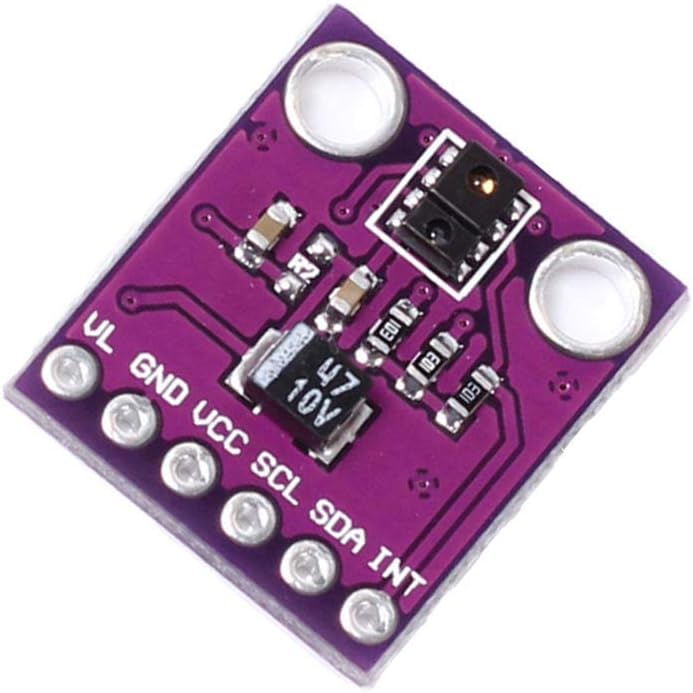
The apds9930 sensor platform allows you to use your APDS9930 ambient light and proximity sensors
(datasheet,
Broadcom) with ESPHome.
The I²C is
required to be set up in your configuration for this sensor to work.
# Example configuration entry
apds9930:
  address: 0x39
  update_interval: 60s
  led_drive: 100ma
  proximity_gain: 8x
  ambient_light_gain: 1x

sensor:
  - platform: apds9930
    type: illuminance
    illuminance:
      name: "Room Illuminance"

  - platform: apds9930
    type: proximity
    proximity:
      name: "Object Proximity"
Configuration variables
The configuration is made up of two parts: The central component and individual sensors.
Base Configuration
address (Optional, int): The I²C address of the sensor. Defaults to
0x39.update_interval (Optional, Time): The interval to check the sensor. Defaults to
60s.led_drive (Optional): The LED drive strength for proximity detection. One of
100ma,50ma,25ma,12.5ma. Defaults to100ma.proximity_gain (Optional): The proximity sensor gain level. One of
1x,2x,4x,8x. Defaults to8x.ambient_light_gain (Optional): The ambient light sensor gain level. One of
1x,8x,16x,120x. Defaults to1x.proximity_diode (Optional, int): Which diode to use for proximity detection. Valid range: 0-3. Defaults to
2.
Sensor
The apds9930 sensor allows you to use your APDS9930 Sensor to perform different
measurements.
Configuration variables:
type (Required, string): The type of sensor measurement. One of
illuminance- Measures illuminance in lux using a two-channel photodiode with IR compensationproximity- Measures object proximity as a raw 16-bit value (0-1023, higher values indicate closer objects)
apds9930_id (Optional, ID): Manually specify the ID of the APDS9930 hub.
All other options from Sensor.
Sensor Types Details
Ambient Light Sensor
The ambient light sensor uses two photodiodes (Ch0: visible + IR, Ch1: IR only) to calculate accurate lux values with IR compensation. The sensor automatically adjusts for different lighting conditions and provides illuminance measurements suitable for:
- Automatic display brightness adjustment
- Daylight harvesting systems
- Light level monitoring
- Circadian rhythm lighting control
Output: Illuminance in lux (unit: lx, device class: illuminance)
Proximity Sensor
The proximity sensor uses an infrared LED and photodiode to detect nearby objects. Unlike the APDS9960 which outputs percentages, the APDS9930 provides raw 16-bit proximity counts (0-1023) for higher resolution and more flexible threshold configuration.
Output: Raw proximity count (0-1023, unitless, higher values = closer objects)
Typical values:
- Far away (>10cm): 0-50
- Medium distance (5-10cm): 50-200
- Near (<5cm): 200-1023
Advanced Configuration
Gain Settings
The gain settings affect sensor sensitivity. Higher gain increases sensitivity but may cause saturation in bright conditions.
Ambient Light Gain:
1x: Best for bright environments (>1000 lux)8x: Good for office lighting (100-1000 lux)16x: Good for dim lighting (10-100 lux)120x: Best for very dim conditions (<10 lux)
Proximity Gain:
1x: Short range, less sensitive2x: Moderate range4x: Good range8x: Maximum range and sensitivity (default)
LED Drive Strength
Controls the infrared LED current for proximity detection. Higher current increases detection range but consumes more power:
100ma: Maximum range (default)50ma: Good range, lower power25ma: Reduced range, low power12.5ma: Minimal range, minimum power
Complete Example
i2c:
  sda: GPIO21
  scl: GPIO22
  scan: true

apds9930:
  address: 0x39
  update_interval: 60s
  led_drive: 100ma
  proximity_gain: 8x
  ambient_light_gain: 1x
  proximity_diode: 2

sensor:
  - platform: apds9930
    type: illuminance
    illuminance:
      name: "Living Room Illuminance"
      id: living_room_lux
      filters:
        - sliding_window_moving_average:
            window_size: 5
            send_every: 5
      on_value_range:
        - below: 50
          then:
            - light.turn_on: main_light
        - above: 200
          then:
            - light.turn_off: main_light

  - platform: apds9930
    type: proximity
    proximity:
      name: "Object Proximity"
      id: object_proximity
      filters:
        - throttle: 1s
      on_value_range:
        - above: 500
          then:
            - logger.log: "Object detected nearby"
            - switch.turn_on: proximity_alert
        - below: 100
          then:
            - switch.turn_off: proximity_alert
Troubleshooting
Proximity Sensor Not Responding
- Increase
led_driveto100mafor maximum range - Increase
proximity_gainto8x - Verify the IR LED is powered (some modules require VL pin connection)
- Check for obstructions or coverings on the sensor
- Ensure the proximity diode setting is correct (default:
2)
Noisy or Unstable Readings
Add filters to smooth readings:
filters:
  - sliding_window_moving_average:
      window_size: 10
      send_every: 5
Reduce
update_intervalfor faster updatesShield sensor from electrical noise sources
Use proper power supply decoupling capacitors
Device IDs
The APDS9930 may report one of two device IDs:
0x12- Most common0x39- Alternative ID
Both IDs are valid and the component automatically recognizes either.
